Make water breaks part of your Mac routine.
A water reminder for Mac is most useful when it appears where you already work. Missy Sippy puts a small companion beside the notch or on the desktop, with water logging available through the companion and the menu bar.
The current Mac App Store release is in preparation. This guide explains the app’s actual workflow and the settings to look for when it becomes available.
Choose a reminder you can live with.
Start with your waking hours. Missy Sippy’s circular schedule lets you choose when you get up and go to bed. Notifications stop two hours before bedtime. Your waking day can cross midnight, which is useful if your workday ends late.
Set a water goal that suits your plan, or choose reminders without a daily target. The starting goal is an editable planning example, not a calculation of your personal fluid needs. If a clinician has given you a fluid limit or plan, follow their guidance.
Keep logging close to the drink.
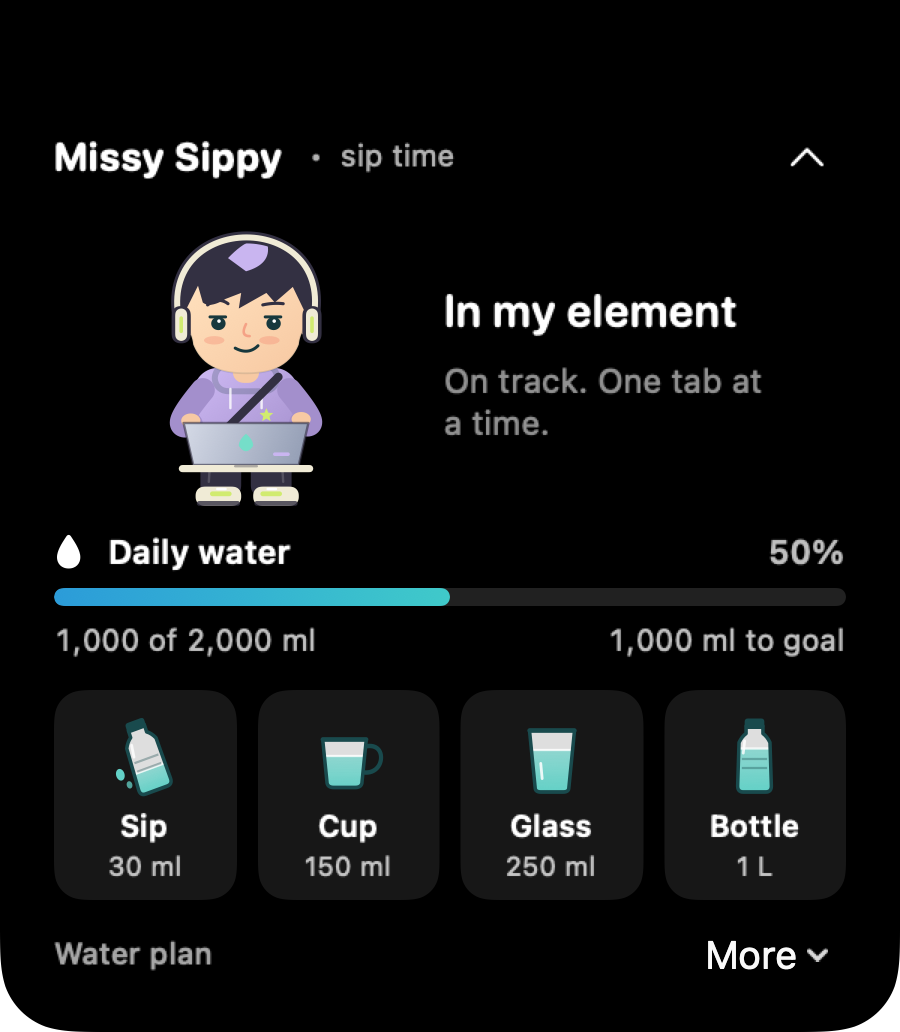
Click the companion or the water drop in the menu bar. Choose a small sip, cup, glass or finished bottle. The presets are estimates of 30 ml, 150 ml, 250 ml and 1 L. Use another amount when your container is different.
The companion takes a sip when you record one, and the daily progress reflects the amount you entered. The app does not detect drinking automatically. “I drank earlier” is a check in rather than an invented water volume.
Use the notch, or skip it.
A notch water reminder can keep a small visual cue close to the menu bar. Clicking Missy Sippy expands its drink choices. A display without a notch is supported too: the companion appears near the menu bar.
If you prefer a desktop water pet, change Companion placement to Roaming pet. You can drag it to another spot. Both placements use the same water log and reminder settings.
Let quiet hours stay quiet.
Enable notifications only if you want them. Missy Sippy uses at least 60 minutes between nudges, with settings for 60 minutes, 90 minutes or two hours. Your drinking records, progress and snoozes can move the next reminder later.
When you meet your selected water goal, reminders rest until the next waking day. If you need a break from a reminder, snooze it. For notification problems, check both the app setting and macOS notification or Focus settings.
Understand what stays private.
Water amounts, schedule and preferences are stored locally on your Mac. Missy Sippy has no app account or cloud sync. Its expressions follow the records you enter, not a measurement of dehydration.
Before resetting data, remember that clearing today’s entries and deleting the full local history are different actions. The privacy policy explains those choices.
What you need.
The app requires macOS 14 or later, supports Apple silicon and Intel, and currently uses an English interface. Amounts are shown in ml and L. It is a native Mac companion, without an iPhone or Apple Watch app in this release.
For setup questions, visit Missy Sippy support or email support@meldorigins.com.